Showing posts with label Jailbreak Using Greenpois0n. Show all posts

Greenpois0n RC6.1 Release with fixed iBooks and Other issues [Download]

    Chronic Dev Team has released a new version of Greenpois0n, Greenpois0n RC 6.1 which includes the fix for famous iBooks issue for jailbreak iPhone, iPod Touch & iPad. In past few days, all greenpois0n Jailbreakers, who attempted to open e-books purchased from the iBook store were prompted with an error message: There is a problem with the configuration of your iPhone. Please restore with iTunes and reinstall iBooks. And, if the device was restored from iTunes, it removed the jailbreak.

    Why iBooks failed to open, if jailbroken on iOS 4.2.1 with Greenpois0n?

    Whenever a user tries to open a iBook, it tries to run unsigned or improperly signed binaries as a test to see if the device is jailbroken. If those binaries run successfully, the device is marked as having been jailbroken and the eBook refuses to open. It was just matter of time for iPhone hackers to identify & make workaround for this issue. Greenpois0n rc6.1 addresses iBook issue. Simpley run over your jailbroken iPhone 4, 3GS & iPod Touch 3G & 4G.

    Download GreenPois0n RC 6.1


    You can follow our earlier Guide HERE on how to Jailbreak iOS device running iOS 4.2.1 untethered using Greenpois0n RC6 [For Mac]

    You can follow our earlier Guide HERE on how to Jailbreak iOS device running iOS 4.2.1 untethered using Greenpois0n RC6 [For Windows]

    For More News on Apple, Microsoft, Google, Web And all new trending in Technology World, Stay Tuned with us. Like us on Facebook and Follow Us on Twitter.

    Source URL: https://nvdem.blogspot.com/search/label/Jailbreak%20Using%20Greenpois0n
    Visit Teleinfo for Daily Updated Hairstyles Collection

Guide: How to untethered Jailbreak Apple Tv 2G on iOS 4.2.1 using Greenpois0n RC6 [Download, How To]

    Chronic Dev Team just updated their Site with latest version of Greenpois0n RC6 which now supports Apple TV 2. Greenpois0n RC6 is available for both Mac and Windows. Greenpois0n RC6 Jailbreak iOS 4.2.1/ iOS 4.2.6 untethered.  We are writing a guide on how to jailbreak Apple TV 2 using Greenpois0n RC6 for Windows. But the same steps follows for Mac too.


    How to: Jailbreak iOS 4.2.1 Untethered on Apple TV 2 using Greenpois0n RC6:

    Download Greenpois0n RC6 here for Windows and Mac.
    Download iOS 4.2.1 for Apple Tv 2G Here.
     
    1. Plug the device to your computer using the USB cable
    2. Quit iTunes if it shows up
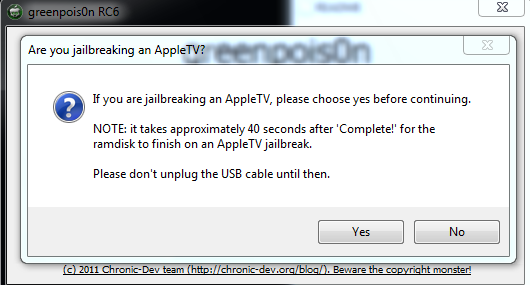
    3. Start greenpois0n.app, It will show a message like below press YES for Apple TV.


    4. Press “Prepare to Jailbreak” button


    5. Follow instructions listed on Greenpois0n App.


    • Plug Apple in to USB for (7 Sec)
    • Plug in Power adapter (3 sec)
    • Press and hold MENU and PLAY/PAUSE (7 Sec)
    • Release Both buttons
    If the above method doesn’t work, you can also try the following steps to get DFU mode.
    • Plug power and USB cables into Apple TV 2.
    • Plug USB cable into your PC.
    • Hold down the menu and down buttons on your Apple TV remote for about 7 seconds, until the light flashes quickly.
    • Now hold down menu and play button for 7 sec until light flashes quickly.
    5. Once done in DFU mode, Press Jailbreak,  This operation will install the jailbreak on the device.
    6. .Your Apple TV should now be successfully jailbroken untethered on iOS 4.2.1. Once done, unplug it from your computer and connect it to your TV again. Navigate to “greenpois0n” menu and select “Inject Software” option to install Cydia package. (As shown in first picture)
    Your Apple TV 2G is now untethered jailbroken. Now you can install third party softwares.
    If anything goes wrong, restore to fresh stock iOS 4.2.1 (iOS 4.1.1) firmware and retry.

    For More News on Apple, Microsoft, Google, Web And all new trending in Technology World, Stay Tuned with us. Like us on Facebook and Follow Us on Twitter.
    Source URL: https://nvdem.blogspot.com/search/label/Jailbreak%20Using%20Greenpois0n
    Visit Teleinfo for Daily Updated Hairstyles Collection
Download Greenpois0n RC6 - Now Supports Apple TV 2G and more Bugs fixes [Released, Download]

    Greenpois0n RC6 version has been released by Dev-Team Member just a moment ago. And it's updated with the support of Apple Tv 2G, and also this new version have fixed the emulator issues.It's available for both Windows And Mac. So now you can also Untethered jailbreak your Apple Tv 2G on iOS 4.2.1. You can download Greenpois0n RC6 for both windows and Mac with the link below.


    Download Greenpois0n For Mac And Windows:


    You can follow our earlier Guide HERE on how to Jailbreak iOS device running iOS 4.2.1 untethered using Greenpois0n  RC6 [For Mac]

    You can follow our earlier Guide HERE on how to Jailbreak iOS device running iOS 4.2.1 untethered using Greenpois0n  RC6 [For Windows]

    You can also follow our guide here to Jailbreak Apple Tv 2G on iOS 4.2.1 [For MAC Only]

    For More News on Apple, Microsoft, Google, Web And all new trending in Technology World, Stay Tuned with us. Like us on Facebook and Follow Us on Twitter.
    Source URL: https://nvdem.blogspot.com/search/label/Jailbreak%20Using%20Greenpois0n
    Visit Teleinfo for Daily Updated Hairstyles Collection

Guide: How to Jailbreak Verizon iPhone 4 on iOS 4.2.6 Using GreenPois0n RC5.4 [How-to, Download]

    Chronic Dev Team has just updated Greenpois0n RC 5.4 to support Verizon iPhone 4 running iOS 4.2.6. It’s a testing version. Chronic Dev Team has not test this version on Verizon iPhone. But initial Results from users are positive about Jailbreaking Verizon iPhone 4 with GreenPoison. Follow our Guide below on how to Jailbreak Verizon iPhone 4 running iOS 4.2.6 using GreenPois0n RC5.4.


    How to: Jailbreak Verizon iPhone 4 running iOS 4.2.6 using Greenpois0n RC5.4:

    Step1: First of all, Download Greenpois0n for Mac.

    Step2: Turn off your device. Now connect your iPhone to your computer,Launch Greenpois0n application from your computer and click on the “prepare to jailbreak(DFU Mode)” button & wait.


    Step3: Follow the simple steps as Greenpois0n guide you to put your device into DFU mode.
    • First of all,Press and Hold the sleep button for 2 seconds.
    • While holding the sleepbutton,Press the Home button for 10 seconds.
    • Now release the sleep button but continue Holding the home button for about 15 seconds.
    Step4: As your device is recognized as in DFU process,you will be prompted to press jailbreak button to start jailbreak process. the Jailbreaking will start  & will be finished automatically.


    Step5: When Jailbreaking is finish click the “quit” button. Your device has been Jailbroken.

    Step6: After the iPhone restarts you’ll notice a new Loader application on your Springboard. Press to launch it. Open Loader and install Cydia. And you are done with Jailbreak.


    For More News on Apple, Microsoft, Google, Web And all new trending in Technology World, Stay Tuned with us. Like us on Facebook and Follow Us on Twitter.
    Source URL: https://nvdem.blogspot.com/search/label/Jailbreak%20Using%20Greenpois0n
    Visit Teleinfo for Daily Updated Hairstyles Collection

Download GreenPois0n RC5.4 to Jailbreak Verizon iPhone 4

    Chronic Dev Team has just updated Greenpois0n RC 5.4 to support Verizon iPhone 4 running iOS 4.2.6. It’s a testing version. Chronic Dev Team has not test this version on Verizon iPhone. But initial Results from users are positive about Jailbreaking Verizon iPhone 4 with GreenPoison.

    Download Greenpois0n RC5.4 for mac [mirror]
    You can follow our guide here on how To Jailbreak Verizon iPhone 4 using Greenpois0n.

    For More News on Apple, Microsoft, Google, Web And all new trending in Technology World, Stay Tuned with us. Like us on Facebook and Follow Us on Twitter.
    Source URL: https://nvdem.blogspot.com/search/label/Jailbreak%20Using%20Greenpois0n
    Visit Teleinfo for Daily Updated Hairstyles Collection

Guide: How to Jailbreak Untethered iOS 4.2.1 with Greenpois0n RC5 on Windows [Guide, Download, How-to]

    Chronic Dev Team has released a windows version of Greenpois0n RC5 for untethered Jailbreak of iOS 4.2.1 for all devices. Supported devices are iPhone 4, 3GS, iPod touch 4G, 3G,2G, iPad, Apple TV 2G. For all those who don’t know Greenpois0n RC5 untethered Jailbreak iOS 4.2.1 without the need of SHSH Blobs of 4.2b3. If you are a Mac user you can follow our guide here to Jailbreak your device on iOS 4.2.1 untethered.

    Remember: Do not update to iOS 4.2.1 if you need the unlock. Ultrasn0w does not support that baseband yet. The only exception is the iPhone 4.

    How To: Jailbreak Untethered iOS 4.2.1 with Greenpois0n RC5 on Windows:

    Step1: First of all, Download Greenpois0n for windows.

    Step2: Turn off your device. Now connect your iPhone to your computer,Launch Greenpois0n application from your computer and click on the “prepare to jailbreak(DFU Mode)” button & wait.


    Step3: Follow the simple steps as Greenpois0n guide you to put your device into DFU mode.
    • First of all,Press and Hold the sleep button for 2 seconds.
    • While holding the sleepbutton,Press the Home button for 10 seconds.
    • Now release the sleep button but continue Holding the home button for about 15 seconds.
    Step4: As your device is recognized as in DFU process,you will be prompted to press jailbreak button to start jailbreak process. the Jailbreaking will start  & will be finished automatically.


    Step5: When Jailbreaking is finish click the “quit” button. Your device has been Jailbroken.

    Step6: After the iPhone restarts you’ll notice a new Loader application on your Springboard. Press to launch it. Open Loader and install Cydia. And you are done with Jailbreak.


    For More News on Apple, Microsoft, Google, Web And all new trending in Technology World, Stay Tuned with us. Like us on Facebook and Follow Us on Twitter.
    Source URL: https://nvdem.blogspot.com/search/label/Jailbreak%20Using%20Greenpois0n
    Visit Teleinfo for Daily Updated Hairstyles Collection

Download Greenpois0n RC5 for Windows to Jailbreak iOS 4.2.1! [Download]

    Chronic Dev Team has released a windows version of Greenpois0n RC5 for untethered Jailbreak of iOS 4.2.1 for all devices. Couple of days back Greenpois0n RC5 for Mac was released. For all those who don’t know Greenpois0n RC5 untethered Jailbreak iOS 4.2.1 without the need of SHSH Blobs of 4.2b3. If you are a Mac user you can follow our guide here to Jailbreak your device on iOS 4.2.1 untethered.


    Download Greenpois0n for Windows Here and here.
     
    follow our guide here how to Jailbreak untethered iOS 4.2.1 using Greenpois0n RC5.

    For More News on Apple, Microsoft, Google, Web And all new trending in Technology World, Stay Tuned with us. Like us on Facebook and Follow Us on Twitter.
    Source URL: https://nvdem.blogspot.com/search/label/Jailbreak%20Using%20Greenpois0n
    Visit Teleinfo for Daily Updated Hairstyles Collection

Guide How to Fix issues and Problems using GreenPois0n RC5 on jailbreak iOS 4.2.1 [Guide]

    GreenPois0n RC5 was released couple of hours back. GreenPois0n RC5 will Untethered Jailbreak iOS 4.2.1. After releasing GreenPois0n People are having different issues and problems with the Green Pois0n RC5. If you haven’t already Jailbreak your device with GreenPois0n RC5 you can follow our guide here.

    Issue One: If you are stopped at ‘Greenpois0n initalized’ then follow the below solution
    Fix One: Retry GreenPois0n again, except when you’ve entered DFU mode, don’t let go of the home button (iSurenix)
    Issue Two: After jailbreak, the Loader does not install Cydia.
    Fix Two: Just download the latest RedSn0w, Click on Browse, Navigate to iOS 4.2.1 IPSW file, Click next, Click on Install Cydia, follow the instruction to put it in DFU. That’s it! The order doesn’t matter: run GP after redsn0w, or run redsn0w after GP (@MuscleNerd)
    POd2g (Chronic Dev Team Member): Please verify you’ve 4.2.1. installed before starting gp. If you’ve Monte, please restore first.
    For More News on Apple, Microsoft, Google, Web And all new trending in Technology World, Stay Tuned with us. Like us on Facebook and Follow Us on Twitter.
    Source URL: https://nvdem.blogspot.com/search/label/Jailbreak%20Using%20Greenpois0n
    Visit Teleinfo for Daily Updated Hairstyles Collection

Guide: How to Untethered Jailbreak iOS 4.2.1 using GreenPois0n RC5 [Download, Guide]

    Chronic Dev Team has released updated version of GreenPois0n RC5 which will untethered Jailbreak iOS 4.2.1 for all Devices. Unlike Redsn0w 0.9.7, GreenPois0n RC5 doesn’t require you to have SHSH blobs of 4.2b3 saved on Cydia. It’s a mac version and Windows Version will release soon. The following instructions will help you jailbreak iOS 4.2.1 on iPhone 4, 3GS, iPod touch 2G/3G/4G, iPad and Apple TV 2G using GreenPois0n.

    NOTE: Greenpois0n recommends a clean restore before continuing. Do not update to iOS 4.1 or iOS 4.2.1 if you need the unlock. Ultrasn0w does not support that baseband yet. The only exception is the iPhone 4. You can update to iOS 4.2.1 without upgrading your baseband by using TinyUmbrella. Start TSS Server->Start iTunes->Plug in your iPhone->Restore 4.2.1->Error 1013->Put phone into DFU Mode->Launch Greenpois0n. We will post more detailed instructions shortly.

    How To: Untethered Jailbreak iOS 4.2.1 Using GreenPois0n RC5 [Guide]:

    STEP 1: Download Greenpois0n From here. (Mirror File)

     
    STEP 2: Power off iPhone and Connect it via USB to your computer and click on “Jailbreak” as seen in the screenshot below.


    Step 3: Now you will be instructed on how to put your iOS device in DFU mode:
    • Press and hold the sleep button for 2 seconds
    • Continue holding sleep; press and hold home for 10 seconds.
    • Release sleep button; continue holding home for 15 seconds.
    STEP 4: GreenPois0n will now start “Jailbreaking” your iOS device untethered on 4.2.1.

    STEP 5: Once Greenpois0n informs you that it has completed you can release the Home button. Click the Complete button to close the application.

    STEP 6: Now the phone will restarts an you will see new Loader application in the Springboard. Open loader and install Cydia.


    STEP 7: Now restart iPhone and open Cydia it will updates and you are good to go with the Jailbreak.

    Download iOS 4.2.1 from here

    For More News on Apple, Microsoft, Google, Web And all new trending in Technology World, Stay Tuned with us. Like us on Facebook and Follow Us on Twitter.
    Source URL: https://nvdem.blogspot.com/search/label/Jailbreak%20Using%20Greenpois0n
    Visit Teleinfo for Daily Updated Hairstyles Collection

Things You Should know Before you Proceed to GreenPois0n RC5 iOS 4.2.1 Untethered Jailbreak


    Chronic Dev Team released GreenPois0n RC5 to Jailbreak iOS 4.2.1 untethered. Pod2g (Chronic Dev Team member) has post some note in his twitter account. It’s important to know before you proceed with Untethered Jailbreak of iOS 4.2.1 using Greenpois0n RC5.
    Below is the full note that have been published by Pod2g about Greenpois0n RC5 iOS 4.2.1 Untethered Jailbreak:

    *** greenpois0n 1.0 RC5 ***

    > Description of the software:

    greenpois0n will Jailbreak your iDevice.

    > Supported iDevices:

    - iPod Touch 2G (all bootroms)
    - iPod Touch 3G
    - iPod Touch 4G
    - iPad 1G
    - iPhone 3Gs (all bootroms)
    - iPhone 4
    - iPhone 4 Verizon (_not_tested_)
    - AppleTV 2

    > Requirements (check this !)

    - a supported device (see above)
    - the device should run iOS 4.2.1. Please check on the device in the Settings -> General -> About page.
    If your device is running an older version, please upgrade iOS first using iTunes.
    *** If you want to SIM Unlock, preserve your baseband using TinyUmbrella ¨***
    - at least MacOSX 10.5

    > Notes (checks this also !)

    - if your device is jailbroken with iPhone Dev Team’s Monte, please restore to fresh 4.2.1. first
    - if Cydia doesn’t show up after Loader, you may need to reboot the device
    - this version of greenpois0n doesn’t include a patched activation system. You’ll need to activate your device using iTunes
    - WE DO NOT SUPPORT PIRACY !

    > Instructions

    1. plug the device to your computer using the USB cable
    2. quit iTunes if it shows up
    3. start greenpois0n.app
    4. follow instructions
    5. the device will boot a 1st time with verbose text on screen. This operation will install the jailbreak on the device.
    6. the device will reboot normally
    7. start the Loader application (green icon on the SpringBoard), and follow instructions to install Cydia
    Follow our Guide Here to Untethered Jailbreak iOS 4.2.1 with Redsn0w RC5!!!

    For More News on Apple, Microsoft, Google, Web And all new trending in Technology World, Stay Tuned with us. Like us on Facebook and Follow Us on Twitter.

    Source URL: https://nvdem.blogspot.com/search/label/Jailbreak%20Using%20Greenpois0n
    Visit Teleinfo for Daily Updated Hairstyles Collection

Guide: How to JailBreak iPod 2G on iOS 4.1 with Greenpois0n.

    This new version of Greenpois0n has now the ability to Jailbreak iPod Touch 2G running iOS 4.1 on your Mac or Windows. It's easy now to Jailbreak your iPod Touch 2G (MC or Non-MC Model).


     You can Download Greenpois0n for Mac & Windows Directly from Here.

    The guide to Jailbreak iPod Touch 2G is same as the Last Guides for iPhone 3GS/4 we have written. If you have not seen those guides then Follow these links.
    To Jailbreak your iPod Touch 2G on Windows Just follow the Guide Here.
    or If you are on Mac then Just Click Here.

    For More News on Apple, Microsoft, Google, Web And all new trending in Technology World, Stay Tuned with us. Like us on Facebook and Follow Us on Twitter.
    Source URL: https://nvdem.blogspot.com/search/label/Jailbreak%20Using%20Greenpois0n
    Visit Teleinfo for Daily Updated Hairstyles Collection

How to Jailbreak iPhone 4/3GS,iPod touch 4G/3G,iPad on iOS 4.1 using Greenpois0n[For Mac]

    Greenpois0n for Mac has atlast been released for Public. Chronic-Dev Team has used the same exploit of GeoHot i.e Limera1n and released the Greenpois0n to Jailbreak iOS 4.1. But they have saved their own SHatter Exploit for future use i.e for more iOS's that will be release in future. You can Jailbreak your iPhone 4/3GS iPod touch 4G/3G and iPad from your Mac using Greenpois0n with this Guide.


    Here is the complete Guide for iOS 4.1 Jailbreak on MAC:

    Note: If you rely on Unlock, do not update to iOS 4.1 as it will upgrade your baseband and make it impossible to unlock for now. Wait for the pwnage tool which will upgrade your iDevice to iOS 4.1 without upgrading the baseband so you’ll be able to unlock it.
    First of all you need to Download Greenpois0n for MAC.
    And also Download:
    iOS 3.2.2 for iPad.

    Now lets Start the Step by Step Guide:

    Step1:Connect your iPhone to your computer,Launch Greenpois0n application from your computer and click on the “jailbreak” button & wait.
    Step2:Follow the simple steps as Greenpois0n guide you to put your device into DFU mode.
    First of all,Press and Hold the sleep button for 2 seconds.
    Step3:While holding the sleepbutton,Press the Home button for 10 seconds

    Step4:Now release the sleep button but continue Holding the home button for about 15 seconds.

    Step5:Once your Device successfully entered in DFU mode your jailbreak will start.

    Step6:Press the quit button when your jailbreak is complete.

    Final Steps:
    When your iPhone/iPod restarts you will see ”loader” on your homescreen, open it and you will find Cydia in it. install the cydia, now after the cydia installed, it will prompt you that remove the loader, so press the remove button and your iPhone/iPod will restart and you are done, your device is now jailbreak with Greenpois0n.

    If you have any question or suggestion about this Guide or any other thing Just Leave a Comment.

    For More News on Apple, Microsoft, Google, Web And all new trending in Technology World, Stay Tuned with us. Like us on Facebook and Follow Us on Twitter.
    Source URL: https://nvdem.blogspot.com/search/label/Jailbreak%20Using%20Greenpois0n
    Visit Teleinfo for Daily Updated Hairstyles Collection

How to Jailbreak iPhone 4/3GS,iPod touch 4G/3G,iPad on iOS 4.1 using Greenpois0n[For Windows]

    Chronic Dev-Team has used the same Limera1n Exploit that was released by GeoHot two days ago, to jailbreak your  iPhone 4/3GS,iPod touch 4G/3G on iOS 4.1 using Greenpois0n on Windows. They have saved the SHatter exploit for future jailbreak of iDevices. Now you can use Greenpois0n to Jailbreak your Device from your Windows.

    Here is the complete Guide for iOS 4.1 Jailbreak on MAC:

    Note: If you rely on Unlock, do not update to iOS 4.1 as it will upgrade your baseband and make it impossible to unlock for now. Wait for the pwnage tool which will upgrade your iDevice to iOS 4.1 without upgrading the baseband so you’ll be able to unlock it.
    First of all you need to Download Greenpois0n for MAC.
    And also Download:
    iOS 3.2.2 for iPad.


    Now lets Start the Step by Step Guide:

    Step1:Connect your iPhone to your computer,Launch Greenpois0n application from your computer and click on the “prepare to jailbreak(DFU Mode)” button & wait.


    Step2:Follow the simple steps as Greenpois0n guide you to put your device into DFU mode.
    • First of all,Press and Hold the sleep button for 2 seconds.
    • While holding the sleepbutton,Press the Home button for 10 seconds.
    • Now release the sleep button but continue Holding the home button for about 15 seconds.

    Step3:As your device is recognized as in DFU process,you will be prompted to press jailbreak button to start jailbreak process. the Jailbreaking will start  & will be finished automatically

    Your device has been Jailbroken.

    These were the Simple steps used to Jailbreak your iOS 4.1 Device on Windows with Greenpois0n.

    If you are on MAC and want to Jailbreak your Device on iOS 4.1, Here is the Complete Guide just for your ease. (GUIDE)

    If you have any question or suggestion about this Guide or any other thing Just Leave a Comment.

    For More News on Apple, Microsoft, Google, Web And all new trending in Technology World, Stay Tuned with us. Like us on Facebook and Follow Us on Twitter.
    Source URL: https://nvdem.blogspot.com/search/label/Jailbreak%20Using%20Greenpois0n
    Visit Teleinfo for Daily Updated Hairstyles Collection