Showing posts with label Windows. Show all posts

Windows 8 to give tough time to iPad and Android Tablets [Infograph]

    Microsoft released the Developer Preview of Windows 8 recently this month to their users, As this Operating System is totally changed from the previous versions of Windows so there's a lot of Scoop about WIndows 8 in the Social Media world. One of the social media listening firm Mashwork analyzed Twitter conversations between June 15th and September 22nd of this year, and found that opinions of Microsoft’s next-generation operating system are overwhelmingly positive at this early stage.


    Mashwork has created an really interesting Infograph, It gives you complete data (Statistics) of what has happened in Socialmedia between this span of time. Check out their Infograph below:


    For More News on Apple, Microsoft, Google, Web And all new trending in Technology World, Stay Tuned with us. Like us on Facebook and Follow Us on Twitter.Source URL: https://nvdem.blogspot.com/search/label/Windows
    Visit Teleinfo for Daily Updated Hairstyles Collection

7 New Metro Themes for Windows 8 [Download Free]

    As Microsoft has recently released the Developer Preview of Windows 8, So lots of developers are getting interested in making some changes (tweaks) to Windows 8 and the first thing tht come in their mind is to change the theme. So some DeviantArt users have developed some really amazing Windows 8 Metro Themes for both 32-bit and 64-bit windows.


    So in order to run these themes on Windows 8 you have to make some changes in Windows 8 Developer Preview system files. Just select your favorite theme below and follow the simple instruction provided with the download.

    1. Blue Windows 8 Metro Theme [Download]


    2. Black Windows 8 Metro Theme [Download]


    3. Purple Windows 8 Metro Theme [Download]


    4. Windows 8 Dark Metro Theme [Download]


    5. Gold Windows 8 Metro Theme [Download]


    6. Blue Metro Theme [Download]


    7. Darker Blue Windows 8 Metro Theme [Download]


    For More News on Apple, Microsoft, Google, Web And all new trending in Technology World, Stay Tuned with us. Like us on Facebook and Follow Us on Twitter.Source URL: https://nvdem.blogspot.com/search/label/Windows
    Visit Teleinfo for Daily Updated Hairstyles Collection

Microsoft released Windows 8 Developer Preview [Download]

    So Microsoft has now released the Windows 8 Developer Preview, so better download that and have a look over this new upgraded OS. And it's not too long when Microsoft will release the Windows 8 Officially to public.


    You can install it on a 32-bit or a 64-bit x86 machine, no activation is required right now. It's an developer build so expect bugs and glitches.
    Other than that you can read Microsoft’s Windows 8 guide to get an idea of what you can expect from the next version of Windows.

    To get the Windows 8 Developer Preview simply visit this link.


    Lock Screen:


    Start Screen:


    Thumb:


    Internet Explorer:


    Files:


    Touch Keyboard:


    For More News on Apple, Microsoft, Google, Web And all new trending in Technology World, Stay Tuned with us. Like us on Facebook and Follow Us on TwitterSource URL: https://nvdem.blogspot.com/search/label/Windows
    Visit Teleinfo for Daily Updated Hairstyles Collection

Microsoft's now preparing for Windows Phone 8 (Apollo) Developement [Report]

    So that's really interesting to know that, Microsoft has now posted a Job for Developers. And this could be the hint toward the new Windows Phone 8 OS. Microsoft is now hiring Developers alegible for this job, The job description is asking for someone to join their Consumer Experience (ConX) team.
    The next version of Windows Phone (WP8) is currently codenamed “Apollo” and is rumoured for release sometime in the middle of 2012.


    The post describes the missions statement and challenge of the Windows Phone team in Windows Phone 8 as “stirring up the out of box experience for Windows Phone 8 and is committed to building/improving a compelling and dynamic high quality look and feel to our end user experience.”
    This is what's been posted for the Job, you can visit here for more details:
    Want to be part of making Windows Phone 8 a reality? Want to work on a strategic and exciting product targeted at the next version of Windows? Then the Consumer eXperience (ConX) team is the place for you! The Windows Phone team is taking on a huge challenge stirring up the out of box experience for Windows Phone 8 and is committed to building/improving a compelling and dynamic high quality look and feel to our end user experience.

    This promises to be a volatile world churning within the OS, Phone 8 as well as our AUT (Application Under Test) that we’ll ship in the Windows Marketplace! Our test team needs a few more key folks to compliment the talent already onboard. We are looking for experienced and intelligent engineers to join our team! Join us in our mission to bring the most compelling Windows Phone experience to customers to date!
    Microsoft's new Windows Phone 8 (Apollo) is rumored to be released in 2012 but before Apollo hits the market perhaps we should await the full deployment of Mango and then Tango to follow.
    Tango will be the second major release of WP7 OS, that is Microsoft is going to release Mango OS and then it will be followed by Tango OS and after that Microsoft is going to release Apollo (WP8) which has been rumored uptil now.

    For More News on Apple, Microsoft, Google, Web And all new trending in Technology World, Stay Tuned with us. Like us on Facebook and Follow Us on Twitter. Source URL: https://nvdem.blogspot.com/search/label/Windows
    Visit Teleinfo for Daily Updated Hairstyles Collection

Top Ten Best Windows 7 Themes to have on your PC [Download]

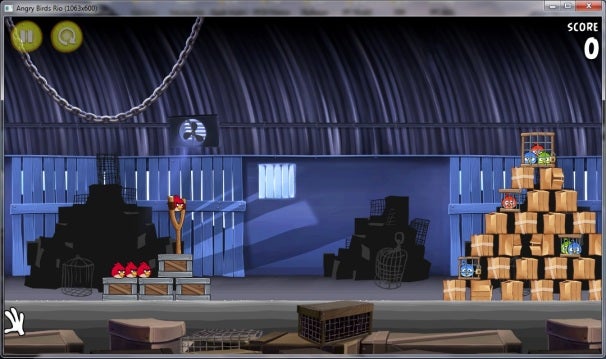
Angry Birds Now Available for Windows [Download]

    Finally, the most famous Game, that made it's fame through iOS is finally available for Windows. After getting successful on Android and Symbian, Rovio tried something new they used WebGL to bring Angry Bird Online directly into your Browser. And they did it, Angry Bird is now also available for Chrome Browser. And now finally, the only Operating which was left is Windows and they've also released a version for it too. You can buy it for Just $5.


    The survival of the Angry Birds is at stake. Dish out revenge on the green pigs who stole the Birds' eggs. Use the unique powers of the Angry Birds to lay waste to the pigs' confounding constructions. Angry Birds features challenging, physics-based demolition gameplay with hours and hours of replay value. Each of the 240+ levels requires logic, skill, and brute force to crush the enemy.
    Two version of Games is right now available for $5, Angry Birds and the Angry Birds Rio. Soon more will be released by Rovio.


    Download:
    You can get Angry Birds from their Official site, either try the Demo version or buy the Full game. Click here to download.

    For More News on Apple, Microsoft, Google, Web And all new trending in Technology World, Stay Tuned with us. Like us on Facebook and Follow Us on Twitter.
    Source URL: https://nvdem.blogspot.com/search/label/Windows
    Visit Teleinfo for Daily Updated Hairstyles Collection

Windows 8 For Tablets Demoed - New Features, Touch-Based Tiles and much more [Video]

    Microsoft has demoed their new upcoming Windows 8 OS, and the good new feature in Windows 8 is that it is optimized for touch devices like tablets and will work equally on all desktops, laptops and netbooks. In this video they have also demoed it's Improved Touch UI, with awesome Multitasking features.
    Microsoft has made this Windows 8 very simple, and easy to use. It's start screen gives you access to the Whole system, represented with large Icons.


    Features of Windows 8 OS:
    • Fast launching of apps from a tile-based Start screen, which replaces the Windows Start menu with a customizable, scalable full-screen view of apps.
    • Live tiles with notifications, showing always up-to-date information from your apps.
    • Fluid, natural switching between running apps.
    • Convenient ability to snap and resize an app to the side of the screen, so you can really multitask using the capabilities of Windows.
    • Web-connected and Web-powered apps built using HTML5 and JavaScript that have access to the full power of the PC.
    • Fully touch-optimized browsing, with all the power of hardware-accelerated Internet Explorer 10

    And this isn’t just about touch PCs,
    The new Windows experience will ultimately be powered by application and device developers around the world — one experience across a tremendous variety of PCs. The user interface and new apps will work with or without a keyboard and mouse on a broad range of screen sizes and pixel densities, from small slates to laptops, desktops, all-in-ones, and even classroom-sized displays. Hundreds of millions of PCs will run the new Windows 8 user interface. This breadth of hardware choice is unique to Windows and central to how we see Windows evolving.
    Check out the Demo Video of Windows 8 on Tablet:


    For More News on Apple, Microsoft, Google, Web And all new trending in Technology World, Stay Tuned with us. Like us on Facebook and Follow Us on Twitter.
    Source URL: https://nvdem.blogspot.com/search/label/Windows
    Visit Teleinfo for Daily Updated Hairstyles Collection

Turn your WIndows 7 into Mac OS X Lion 10.7 with the new Theme [Download]

    Mac OS X Lion 10.7 is not yet released but we have already got the Mac OS like theme for Windows 7. Which will Transform your Windows 7 into a Mac. You'll definitely like to try this on your Windows. In Past there were also some Transformation packs released like Snow Leopard OS for Windows which changes everything in Windows and turn it into a Mac. The same we have here now, check it out below:

    You get lots of Options when you install this theme same like Mac. And the Interface of your Windows will be totally transform into a Mac OS.

    Note: Please bear in mind that such transformation packs are difficult to uninstall and often a system restore point will not revert the changes. Before installing the Lion Skin Pack, make sure that you backup your computer to revert the changes (if required). Moreover, make sure that UAC (User Account Control) is disabled.

    How to Install:
    There is nothing to hard in installing this theme on your Windows 7.

    First Just download:

    Then simply run the Executable File, And Follow the simple steps.

    Then you'll be asked for Multiple Choices which you want to add with this theme:


    And after everything is Done, Just Reboot your computer to get the settings saveed:


    Enjoy Mac on your Windows!

    For More News on Apple, Microsoft, Google, Web And all new trending in Technology World, Stay Tuned with us. Like us on Facebook and Follow Us on Twitter.
    Source URL: https://nvdem.blogspot.com/search/label/Windows
    Visit Teleinfo for Daily Updated Hairstyles Collection

Leaked Screenshot of Windows Appstore for Windows 8 [Image]

    Some Guys at Cnbeta has got an Screenshot of the new Windows Appstore, which will be featured in windows 8 as well as the Previous versions too. As we know that Apple has already an Appstore for Mac and Google Chrome OS has an Appstore too. So this screenshot whyich is leaked might be a possibility that Microsoft has already created their Appstore for Windows and it's waiting for the release. Check out the Screenshot Below:


    It's already been confirmed that Windows 8 is going to release in 2012. Recently there were some development Plans leaked from Microsoft, which showed the roadmap of Windows 8 and it has reached it's 3rd Milestone of it's development.

    For More News on Apple, Microsoft, Google, Web And all new trending in Technology World, Stay Tuned with us. Like us on Facebook and Follow Us on Twitter.
    Source URL: https://nvdem.blogspot.com/search/label/Windows
    Visit Teleinfo for Daily Updated Hairstyles Collection

Download Skype 5.3 for Windows with Improved Video Quality

    Skype for Windows has now been updated to v5.3 with Better Video Calling Experience, and there are also some Bugs Fixes with it. Overall User Interface has also been Improved.
    You might have missed that, Skype has also started a competition in which they want the users to create the best Chat Style for them for the Next Version of Skype for Mac, and the Winner will get a prize as well as his Style will also be integrated in The New Skype for Mac. Click here for Details.

    Skype 5.3 Features:
    • Improved quality of video received from Skype on mobile devices
    • Skype shows users’ presence icons on collapsed contact profile cards
    • Conversation topic editing button is now always available on the conversation header
    • If a phone number is added to a profile after a failed call attempt, Skype starts a call automatically
    • Automatically switch to SMS entry after user adds mobile phone number to profile after failing to send SMS due to lack of phone number

    Download:

    For More News on Apple, Microsoft, Google, Web And all new trending in Technology World, Stay Tuned with us. Like us on Facebook and Follow Us on Twitter.
    Source URL: https://nvdem.blogspot.com/search/label/Windows
    Visit Teleinfo for Daily Updated Hairstyles Collection

Redsn0w 0.9.6 RC9 and Pwnage Tool 4.3 released to Untethered Jailbreak iOS 4.3.1 and iOS 4.3 [Download] [How to Guide]

    iPhone Dev Team has just released Redsn0w 0.9.6 RC9 for Windows and Pwnage tool 4.3 for Mac to Untethered Jailbreak iOS 4.3.1 and iOS 4.3.You'll also be able to preserve baseband and Unlock iPhone on Firmware 4.3.1 (only compatible basebands) with Pwnage Tool and Redsn0w. You can only Untethered Jailbreak iPhone 4, 3GS, iPod touch 4G, 3G, iPad and Apple TV 2G (FW 4.3) on iOS 4.3 and iOS 4.3.1. We have posted download links for both Redsn0w and Pwnage Tool.

    iPad 2 users still have to wait, because this release of Redsn0w and Pwnage Tool won't jailbreak the iPad 2.

    Download Redsn0w 0.9.6 RC9 [MAC] [Windows]

    Download Pwnage Tool 4.3 For Mac. [Torrent Download link]
    or Direct download from Dev Team.


    Windows Users, you can follow our Guide Here to Untethered Jailbreak iOS 4.3.1 and iOS 4.3 with Redsn0w 0.9.6 RC9 for iPhone 4, 3GS, iPod touch 4G, 3G, iPad and Apple TV 2G (FW 4.3).

    Mac Users, they can follow our Guide here to Untethered Jailbreak iOS 4.3.1 and iOS 4.3 with Pwnage Tool 4.3 for iPhone 4, 3GS, iPod touch 4G, 3G, iPad and Apple TV 2G (FW 4.3).

    For More News on Apple, Microsoft, Google, Web And all new trending in Technology World, Stay Tuned with us. Like us on Facebook and Follow Us on Twitter
    Source URL: https://nvdem.blogspot.com/search/label/Windows
    Visit Teleinfo for Daily Updated Hairstyles Collection

FireFox 4 Beta 12 Released for Windows/Mac/Linux, with 650 Bugs fixed [Download]

    Firefox has finally released the new Beta version of Firefox 4. It is now available to download. This new beta version is said to have fixed more than 650 Bugs Including a fix for a memory leak that kept Firefox consuming RAM even without opening new tabs. This new beta version is a massive update for Firefox, a few days ago Firefox was updated for iOS devices and now an massive update for Windows/Mac/Linux version has also been released.

    This new version of FireFox has got so many new features and so many other Bugs fixed. Here are it's list of new features that are included in it:

    New Features in Firefox Beta 12:
    • Increased performance while viewing Flash content
    • Improved plugin compatibility with hardware acceleration enabled
    • Hovering over links now displays the URL at the bottom of the window rather than in the location bar
    • General stability, performance, and compatibility improvements  

    Release Note:
    This Firefox 4 Beta is considered to be stable and safe to use for daily web browsing, though the features and content may change before the final product release. At this time many Add-ons may not yet have been tested by their authors to ensure that they are compatible with this release. If you wish to help test Add-on compatibility, please install the Add-on Compatibility Reporter - your favorite Add-on author will appreciate it!

    It also includes all the features what previous FireFox Beta had. You can see below the Screenshot of FireFox 4 Beta 12 how it looks:
    Screenshot:


    Download:
    You can now Download Firefox 4 Beta 12 for your Windows, Linux, and Mac OS X Here.

    For More News on Apple, Microsoft, Google, Web And all new trending in Technology World, Stay Tuned with us. Like us on Facebook and Follow Us on Twitter.
    Source URL: https://nvdem.blogspot.com/search/label/Windows
    Visit Teleinfo for Daily Updated Hairstyles Collection

Developement Plans for Windows 8 Leaked from Microsoft

    We already know about the Microsoft's Windows 8, as they have updated us in 2010 that Windows 8 will be released in 2012. But no one was aware of their Developement Plans. Now according to a report some of Windows 8 Developement Plans are leaked from Microsoft. And yestereday ZDNet revealed Microsoft’s internal Windows 8 roadmap which you can see in the Image Below.


    The Above RoadMap Image reveals that, Microsoft has reached the Milestone 2 in the developement of Windows 8, And they will start working on Milestone 3 from 28th of the February.

    According to Winrumors:
    Milestone 3 work should take around five months, assuming it has to go through the same coding, integration and then fixing and lockdown stages as M2. The software giant has compiled a number of Milestone 2 builds recently ready for the final M2 build that will be distributed internally and externally to the company’s closest partners. Microsoft compiled 6.2.7947.0.winmain_win8m2_escrow.110218-1608 on Friday following a number of Windows 8 builds over the past couple of weeks.
     Microsoft haven't revealed anything itself about this, And they are being very quiet about the developement of Windows 8.  Windows Chief, Steven Sinofsky have just shown the Preview Image of Windows 8 at CES Las Vegas:


    We've already update you about the Interview from Steve Ballmer. In which he said that the next release of Windows as the company’s “riskiest product bet”. It is understood that Microsoft will feature deep cloud integration into the future OS to realise its vision of “three screens and a cloud”.

    You can see the Interview video Below:


    For More News on Apple, Microsoft, Google, Web And all new trending in Technology World, Stay Tuned with us. Like us on Facebook and Follow Us on Twitter.
    Source URL: https://nvdem.blogspot.com/search/label/Windows
    Visit Teleinfo for Daily Updated Hairstyles Collection

Windows Phone 7 Multitasking UI Feature Video Demonstration [Demo Video]

    Microsoft CEO Steve Ballmer announced so many new features of Windows Phone 7 (WP7) phones in his Press Event at MWC 2011. These new features which he announced includes the ability to Copy / Paste, Internet Explorer 9 browsing experience, Xbox Kinect Integration as well as a much improved multitasking UI. Microsoft demonstrated a video of their new Wp7 Multitasking UI feature on their WP7 early update (Codename “Mango”). Mango is scheduled by Microsoft to release it at the end of this year. Another new feature which is added to Mango is the SkyDrive and Twitter integration in it.


    With this new Multitasking UI feature you'll be able to quickly switch between applications, resume apps and use a new UI to check the state and switch to running apps. The multitasking feature is the same like Windows 7, before switching to another App it gives you an Overview of that App.

    According to WinRumors:
    Belfiore demonstrated the new multitasking functions of Windows Phone which will allow users to quickly switch between applications, resume apps and use a new UI to check the state and switch to running apps. The UI is similar to Microsoft’s Windows 7 peek function as it gives an overview of the application state before the switch occurs. Microsoft’s multitasking for Windows Phone addresses a key criticism of the new operating system and is scheduled to ship as part of a big release possibly named Windows Phone 7.5.
    You can see the Multitasking UI feature of WP7 demonstrated in the video below:


    For More News on Apple, Microsoft, Google, Web And all new trending in Technology World, Stay Tuned with us. Like us on Facebook and Follow Us on Twitter.

    [Via]
    Source URL: https://nvdem.blogspot.com/search/label/Windows
    Visit Teleinfo for Daily Updated Hairstyles Collection

Internet Explorer 9 Release Canditate - Released by Microsoft [Download]

    Microsoft has released Internet Explorer 9 Release Candidate in 40 languages. You can download version 9.0.8080.16412 now for: Windows Vista 32-bit and Windows Server 2008 32-bit, Windows Vista 64-bit and Windows Server 2008 64-bit, Windows 7 32-bit, and Windows 7 64-bit and Windows Server 2008 R2 64-bit.[Download]


    The new RC build includes a Tracking Protection feature, which gives users the option to control what third-party site content can track them when they’re online, as well as a new ActiveX filtering option, which allows users to turn on/off ActiveX plug-ins. Best of all, Microsoft has addressed what was arguably the biggest complaint with the new version (the company has gone through over 17,000 pieces of feedback): if you want your tabs on a separate line from the address box, there's now an option to turn that on from the right click menu at the top of the browser.


    At the same time, IE9 RC is significantly faster than the beta version. Furthermore, many site rendering issues have been fixed, although we can't say that it's working perfectly. Last but not least, the new build includes hundreds of bug fixes.
    Microsoft released the IE9 beta five months ago. The software giant also took the opportunity to announce that the beta surpassed 25 million downloads, making it the most downloaded beta release of Internet Explorer ever. Redmond is likely to release the final version of IE9 at its Mix11 event (April 12 to April 14, 2011). 

    "IE9 RC supports additional emerging Web standards including CSS3 2D Transforms, HTML5 Geolocation and a set of HTML5 semantic elements," a Microsoft spokesperson said in a statement. "We've added support for the HTML5 canvas global­Composite­Operation property and improved the performance of canvas’s Canvas­Pixel­Array. We've updated IE9 RC to reflect changes to the DOM events and added accessibility to the HTML5 audio and video controls. These additions reflect our pattern of implementing site ready HTML5 while ensuring developers can experiment with new and emerging specifications through our HTML5 Labs. As these specifications become stable, you can expect we will implement them in IE as we have throughout the development of IE9." 
    For More News on Apple, Microsoft, Google, Web And all new trending in Technology World, Stay Tuned with us. Like us on Facebook and Follow Us on Twitter.
    Source URL: https://nvdem.blogspot.com/search/label/Windows
    Visit Teleinfo for Daily Updated Hairstyles Collection

Guide: How to Jailbreak Untethered iOS 4.2.1 with Greenpois0n RC5 on Windows [Guide, Download, How-to]

    Chronic Dev Team has released a windows version of Greenpois0n RC5 for untethered Jailbreak of iOS 4.2.1 for all devices. Supported devices are iPhone 4, 3GS, iPod touch 4G, 3G,2G, iPad, Apple TV 2G. For all those who don’t know Greenpois0n RC5 untethered Jailbreak iOS 4.2.1 without the need of SHSH Blobs of 4.2b3. If you are a Mac user you can follow our guide here to Jailbreak your device on iOS 4.2.1 untethered.

    Remember: Do not update to iOS 4.2.1 if you need the unlock. Ultrasn0w does not support that baseband yet. The only exception is the iPhone 4.

    How To: Jailbreak Untethered iOS 4.2.1 with Greenpois0n RC5 on Windows:

    Step1: First of all, Download Greenpois0n for windows.

    Step2: Turn off your device. Now connect your iPhone to your computer,Launch Greenpois0n application from your computer and click on the “prepare to jailbreak(DFU Mode)” button & wait.


    Step3: Follow the simple steps as Greenpois0n guide you to put your device into DFU mode.
    • First of all,Press and Hold the sleep button for 2 seconds.
    • While holding the sleepbutton,Press the Home button for 10 seconds.
    • Now release the sleep button but continue Holding the home button for about 15 seconds.
    Step4: As your device is recognized as in DFU process,you will be prompted to press jailbreak button to start jailbreak process. the Jailbreaking will start  & will be finished automatically.


    Step5: When Jailbreaking is finish click the “quit” button. Your device has been Jailbroken.

    Step6: After the iPhone restarts you’ll notice a new Loader application on your Springboard. Press to launch it. Open Loader and install Cydia. And you are done with Jailbreak.


    For More News on Apple, Microsoft, Google, Web And all new trending in Technology World, Stay Tuned with us. Like us on Facebook and Follow Us on Twitter.
    Source URL: https://nvdem.blogspot.com/search/label/Windows
    Visit Teleinfo for Daily Updated Hairstyles Collection