Showing posts with label Pwnage Tool. Show all posts

Download Updated Redsn0w 0.9.6 RC16 and Sn0wbreeze 4.3.3.1 to Fix Bugs and Side Switch Vibration Issue on iPhone 4/ iPhone 3GS [How to]

    iPhone Dev Team has now Updated their Jailbreak tools that is redsn0w has now been updated to RC16 and Pwnage Tool has also been updated to v4.3.3.1. The reason for which they have updated these Jailbreak tools, Is because when your iPhone 4 or iPhone 3GS was jailbroken with Previous Version, It created an side switch vibration issue (only for 4.3.3). By the release of this new Version this Bug has been fixed and other than that it also fixes verbose booting for 3GS, and fixed problem for uploading ramdisk in Windows 7.

    Note: There is still no Jailbreak for iPad 2.
    According to iPhone Dev Team:
    PwnageTool and redsn0w have been updated to include a fix for the iPhone3GS/i4 side switch vibration issue (only for 4.3.3!). Thanks to @i0n1c for tracking this down (even though he doesn’t even have an iPhone!).

    If you’re already jailbroken at 4.3.3 (by either redsn0w or custom IPSW), you can install this fix simply by running redsn0w rc16 over your existing jailbreak. Just uncheck the “Install Cydia” option and check any other options you want. The fix will be installed no matter what you’ve selected. This is safe for even ultrasn0w unlockers to do (because redsn0w itself won’t update your baseband…only an iTunes stock IPSW update/restore will do that).

    redsn0w rc16 has a few more improvements: Windows 7 and Vista users should no longer need to set their CPU affinity…just run redsn0w as Administrator in XP compatiblity mode. Also, the “verbose boot” option for old-bootrom iPhone 3GS has been fixed for 4.3.3 (remember: old-bootrom 3GS users can even have custom bootlogos that show right at power-up). Enjoy!
    Download Redfsn0w 0.9.6 RC16 For:

    Guide:

    So after you've Download these, Just try to re Jailbreak your iPhone 4, iPhone 3GS with it. And it will fix the Bugs. Click here to See the How to Guide For Jailbreaking.

    For More News on Apple, Microsoft, Google, Web And all new trending in Technology World, Stay Tuned with us. Like us on Facebook and Follow Us on Twitter.
    Source URL: https://nvdem.blogspot.com/search/label/Pwnage%20Tool
    Visit Teleinfo for Daily Updated Hairstyles Collection

Download Redsn0w 0.9.6 RC15 and Pwnage Tool 4.3.3 to Untethered Jailbreak iOS 4.3.3 on iPhone, iPod Touch and iPad [Released]

    iPhone Dev team has just released New version of Redsn0w and Pwnage Tool to Untethered Jailbreak iOS 4.3.3. As they have already updated us that they have used the same 10n1c's Exploit in this Jailbreak. So you can now Download Redsn0w 0.9.6 RC15 to Untethered Jailbreak iOS 4.3.3 on Windows and Mac. Or you can also use Pwnage Tool to Jailbreak only on Mac.
    Note: Redsn0w and Pwnage Tool still doesn't support iPad Jailbreak, So you still have to wait.

    According to iPhone Dev Team:
    three in a row!  Apple released iOS 4.3.3 on Wednesday, and once again the untethered jailbreak exploit that @i0n1c created for 4.3.1 still works.  That makes it an unprecedented three firmwares where the same userland exploit works.  We’re not exactly sure why Apple hasn’t fixed the hole yet, but we’re not complaining!
    Today’s PwnageTool and redsn0w incorporate @i0n1c’s port to 4.3.3 (it’s ironic that such a long-lasting untether doesn’t even have an official name!).  It also of course uses geohot’s limera1n bootrom exploit to inject the jailbreak.  The 4.3.3 untether works on all devices that actually support 4.3.3 except for the iPad2:
    • iPhone3GS
    • iPhone4 (GSM)
    • iPod touch 3G
    • iPod touch 4G
    • iPad1
    • AppleTV2G (v4.3 8F202)
    Some things to note:
    1. ultrasn0w unlockers must stay away from redsn0w!  Use only a custom IPSW to update to 4.3.3, to avoid updating your baseband.
    2. ultrasn0w has been updated to v1.2.3 to be compatible with iOS 4.3.3 and earlier (the ultrasn0w update does not include any new baseband support!). Please reboot your iPhone using the normal “slide to power off” swipe after installing ultrasn0w 1.2.3.
    3. By popular demand, redsn0w now allows you to enable multitasking gestures (although most will find it useful only on iPads).
    4. iPad2 update:  The iPad2 jailbreak remains under development.  As you may know, the original exploit @comex developed in the first week of the iPad2 release was mysteriously fixed by Apple within days of its development.  Partly because of this, don’t expect much public discussion of the iPad2 jailbreak until it’s actually finished and ready for release (and please avoid asking about it).  In all liklihood, it will be a userland exploit like the first (unreleased) one, not dependent on bootrom dumps.  The first one can’t be released even for those with the original 4.3 firmware due to legal (distribution) reasons.
    Download Redsn0w 0.9.6 RC15:


    For More News on Apple, Microsoft, Google, Web And all new trending in Technology World, Stay Tuned with us. Like us on Facebook and Follow Us on Twitter.
    Source URL: https://nvdem.blogspot.com/search/label/Pwnage%20Tool
    Visit Teleinfo for Daily Updated Hairstyles Collection

Guide: How to Untethered Jailbreak iOS 4.3./ iOS 4.3 on iPhone, iPod Touch and iPad with Pwnage Tool [Mac] [Download] [How to]

    iPhone Dev Team has released Pwnage Tool for Mac users to Untethered jailbreak iOS 4.3.1 or iOS 4.3. With this Pwnage Tool you'll be able to Untethered Jailbreak iPhone 4, 3GS, iPod touch 4G, 3G, iPad and Apple TV 2G (FW 4.3) on iOS 4.3 and iOS 4.3.1.  Here we have posted a Guide for Mac on Pwnage Tool to Simple Untethered Jailbreak your Device with ease. You just have to follow our simple steps to Untethered Jailbreak your Device. See the Guide below:

    This Jailbreak is not for iPad 2 users as it Pwnage tool won't be able to jailbreak your device at the moment, iPad 2 users have to wait some time for the exploit to untethered jailbreak iPad 2.

    Note: With this you can also retain Baseband(Older Firmware) so that you can unlock your iPhone 4 and iPhone 3GS with UltraSn0w

    For Windows Users: Windows Users can follow our guide here to Jailbreak their Devices using Redsn0w 0.9.6 RC9.

    Guide: How to Untethered Jailbreak iPhone 4, 3GS, iPod touch 4G, 3G, iPad and Apple TV 2G (FW 4.3) on iOS 4.3 and iOS 4.3.1 with Pwnage Tool [For Mac]

    First of all, you need to Download the Following as it will be required later.

    Pwnage Tool 4.3 For Mac [Download link]
    iOS 4.3.1 or iOS 4.3 IPSW File [Download Link]
    iTunes 10.2.1 [Download Link]

    Step 1: Start iTunes and sync your iPhone/iPod touch/iPad and back up all your data before proceeding with jailbreak process.

    Step 2: Start PwnageTool 4.3 in “Expert mode” and select your device


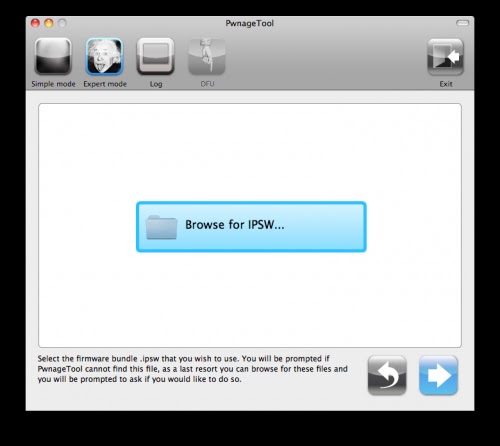
    Step 3: Browse for iOS 4.3.1 firmware for your device as shown in the screenshot below

    Step 4: Now select “Build” to start creating custom 4.3.1 firmware file


    Step 5: PwnageTool will now create the custom .ipsw file for your iPhone, iPad or iPod touch which will be  Untethered jailbroken.


    Step 6: Once the IPSW is build, you will prompted to put your device in DFU mode, Pwnage tool will guide you how to put your device in DFU mode.Follow the simple steps to put your Device into DFU Mode:
    • First of all,Press and Hold the sleep button for 2 seconds.
    • While holding the sleepbutton,Press the Home button for 10 seconds.
    • Now release the sleep button but continue Holding the home button for about 15 seconds.
    Step 7: Start iTunes, click on your iOS device icon from the sidebar in iTunes. Now press and hold left “alt” (option) button on Mac, or Left “Shift” button if you are on Windows on the keyboard and then click on “Restore” (Not “Update” or “Check for Update”) button in the iTunes and then release this button.

    This will make iTunes prompt you to select the location for your custom firmware 4.3.1 file. Select the required custom .ipsw file that you created above, and click on “Open”.
    This will take almost 10 Minutes and your Device is Jailbroken After That Congratulations!.

    How To Unlock iPhone 3GS and iPhone 4 on Older Basebands:

    Dev Team will release new version of UltrasN0w in some time so you'll be able to Unlock your Device on Following Basebands 01.59.00 / 04.26.08 / 05.11.07 / 05.12.01 / 05.13.04 / 06.15.00. 

    Stay Tuned we'll post it as it's release!

    For More News on Apple, Microsoft, Google, Web And all new trending in Technology World, Stay Tuned with us. Like us on Facebook and Follow Us on Twitter
    Source URL: https://nvdem.blogspot.com/search/label/Pwnage%20Tool
    Visit Teleinfo for Daily Updated Hairstyles Collection

Redsn0w 0.9.6 RC9 and Pwnage Tool 4.3 released to Untethered Jailbreak iOS 4.3.1 and iOS 4.3 [Download] [How to Guide]

    iPhone Dev Team has just released Redsn0w 0.9.6 RC9 for Windows and Pwnage tool 4.3 for Mac to Untethered Jailbreak iOS 4.3.1 and iOS 4.3.You'll also be able to preserve baseband and Unlock iPhone on Firmware 4.3.1 (only compatible basebands) with Pwnage Tool and Redsn0w. You can only Untethered Jailbreak iPhone 4, 3GS, iPod touch 4G, 3G, iPad and Apple TV 2G (FW 4.3) on iOS 4.3 and iOS 4.3.1. We have posted download links for both Redsn0w and Pwnage Tool.

    iPad 2 users still have to wait, because this release of Redsn0w and Pwnage Tool won't jailbreak the iPad 2.

    Download Redsn0w 0.9.6 RC9 [MAC] [Windows]

    Download Pwnage Tool 4.3 For Mac. [Torrent Download link]
    or Direct download from Dev Team.


    Windows Users, you can follow our Guide Here to Untethered Jailbreak iOS 4.3.1 and iOS 4.3 with Redsn0w 0.9.6 RC9 for iPhone 4, 3GS, iPod touch 4G, 3G, iPad and Apple TV 2G (FW 4.3).

    Mac Users, they can follow our Guide here to Untethered Jailbreak iOS 4.3.1 and iOS 4.3 with Pwnage Tool 4.3 for iPhone 4, 3GS, iPod touch 4G, 3G, iPad and Apple TV 2G (FW 4.3).

    For More News on Apple, Microsoft, Google, Web And all new trending in Technology World, Stay Tuned with us. Like us on Facebook and Follow Us on Twitter
    Source URL: https://nvdem.blogspot.com/search/label/Pwnage%20Tool
    Visit Teleinfo for Daily Updated Hairstyles Collection

iOS 4.3.1 Untethered Jailbreak for iPhone,iPod Touch, iPad will be released in few Hours [Confirmed]

    It's just been confirmed that the untethered Jailbreak for iOS 4.3.1/iOS 4.3 will be released on 'Funday' means it's Sunday and it will be released today. iPhone Dev Team will release both Pwnage Tool for Mac and Redsn0w for Windows to Untethered Jailbreak our iPhone, iPod Touch and iPad. These two Jailbreak tools will Untethered Jailbreak the Following Devices: iPhone 4, 3GS, iPod touch 4G, 3G, iPad and Apple TV 2G (FW 4.3) on iOS 4.3 and iOS 4.3.1.
    The bad news is that iPad 2 users still have to wait, because this release of Redsn0w and Pwnage Tool won't jailbreak the iPad 2.
    Here's what MuscleNerd Confirmed in his tweet:

    @adiazrulnizam redsn0w+PwnageTool using @i0n1c‘s 4.3.1 untether (except iPad2) are on track for Funday release (USA time)
    You'll be able to preserve baseband and Unlock iPhone on Firmware 4.3.1 (only compatible basebands) with Pwnage Tool and Redsn0w.

    We'll update you when the Untethered Jailbreak is released, Stay Tuned with us!!!

    For More News on Apple, Microsoft, Google, Web And all new trending in Technology World, Stay Tuned with us. Like us on Facebook and Follow Us on Twitter
    Source URL: https://nvdem.blogspot.com/search/label/Pwnage%20Tool
    Visit Teleinfo for Daily Updated Hairstyles Collection

Pwnage Tool 4.2 Released For Untethered Jailbreak of iDevices and Preserving Baseband [Download]

Redsn0w and Pwnage Tool Will soon be Able to Jailbreak iOS 4.2.1

    Few days back Greenpois0n RC5 was launched to jailbreak your iDevice ( iPod Touch, iPhone 3G/4 and iPad)  on iOS 4.2.1 . Just a while ago , Chronic Dev Team Member, Pod2G has just announced in a tweet mentioned to MuscleNerd,  that the entire Greenpois0n RC5 project will become open source soon after 1 week they release the win32 build. This means that the source code of the tool for the jailbreak will be made available to the developers so they can study the tool and find , the way it works, or may be edit it to update for themselves.


    The news, however is more beneficial to the renown hackers of the iPhone Dev Team, as they will be able to update there jailbreak tools, that is Redsn0w and the Pwnage Tool and will be able to jailbreak iOS 4.2.1 using untethered iOS exploit used in Greenpois0n RC5.

    For More News on Apple, Microsoft, Google, Web And all new trending in Technology World, Stay Tuned with us. Like us on Facebook and Follow Us on Twitter.
    Source URL: https://nvdem.blogspot.com/search/label/Pwnage%20Tool
    Visit Teleinfo for Daily Updated Hairstyles Collection

Guide: How to Jailbreak iOS 4.3 Beta 1 on iPhone 4 using Pwnage Tool

    An Unofficial version of Pwnage tool has been released which will Jailbreak iOS 4.3 Beta 1 for developers on iPhone 4 only. For all those who don’t know, Pwnage Tool is a Jailbreak Tool for Mac users. It creates a custom firmware which is jailbroken and it is based on GeoHot LimeRa1n Exploit which has already pwned all current iOS devices for life! Now this Pwnage tool only support iPhone 4, other versions will follow soon.

    NOTE:

    Recall that this is NOT an official software (it was not issued by the Dev Team) and not tested by our members. Therefore, Proceed at your own risk only. We are not to be held responsible if you end up bricking your iPhone.

    Follow our guide here on How To Jailbreak iPhone 4 on iOS 4.3 beta 1 using Pwnage Tool.

    Remember to download latest version of iTunes when performing this Jailbreak. and when Pwnage tool ask for firmware. browse for iOS 4.3 Beta 1. Rest of the guide is same as before.

    For More News on Apple, Microsoft, Google, Web And all new trending in Technology World, Stay Tuned with us. Like us on Facebook and Follow Us on Twitter.
    Source URL: https://nvdem.blogspot.com/search/label/Pwnage%20Tool
    Visit Teleinfo for Daily Updated Hairstyles Collection

How to Restore your iPhone 3GS/3G on Baseband 06.15.00 on iOS 4.2.1/iOS 4.1

    All those people who are having issues while restoring their iPhone 3GS/ 3G to iOS 4.2.1 and iOS 4.1 on Baseband 06.15.00. Sherif-Hashim iPhone Dev Team member has just released a Solution to restore iPhone 3GS and 3G Baseband 06.15.00 to iOS 4.2.1 and iOS 4.1. Users having issue with restoring their Firmware can simply follow these simple steps to restore your iPhone 3GS/3G given by Sherif-Hashim. He has given two Option to choose from, if you either want to use Pwnage Tool or Redsn0w. Check it after the break.

    To restore your iphone while already on 6.15.00 BB:

    A. If you used PwnageTool, then create a new custom iOS 4.1 or iOS 4.2.1 firmware. Say NO when asked for baseband update to 6.15.00 as you already have it.
    Build the custom IPSW and restore your iPhone.
    B. In case of Redsn0w, use Step 1 if you are on 4.1 or Step 2 if you are on 4.2.1.
    1. If you are currently on iOS 4.1, then you can restore to the official 4.1 IPSW again. In case you see error 1015, simply kick your device out of recovery mode using TinyUmbrella or RecBoot.
    DONT check the option ‘Install iPad Baseband’ in Redsn0w as you already have it.
    2. In case you are on 4.2.1, then first restore back to iOS 4.1.  This is because with 4.2.1, you cannot kick your device out of recovery when you iTunes throws up error 1015.

    For More News on Apple, Microsoft, Google, Web And all new trending in Technology World, Stay Tuned with us. Like us on Facebook and Follow Us on Twitter.
    Source URL: https://nvdem.blogspot.com/search/label/Pwnage%20Tool
    Visit Teleinfo for Daily Updated Hairstyles Collection

How to: Jailbreak iPhone 4/3GS,iPod touch 4G/3G,iPad on iOS 4.1 using Pwnage Tool[for MAC & Windows]

    Pwnage tool released to jailbreak iOS 4.1 while also making your iDevice unlockable with other carrier. For all those who don’t know, Pwnage Tool is a Jailbreak Tool for Mac users. It creates a custom firmware which is jailbroken and it also preserve your baseband so you can unlock your device.


    Pwned
    Pwnage tool supports iPhone 4, iPhone 3GS (new bootrom), iPhone 3G, iPad (running 3.2.2), iPod touch 4G, iPod touch 3G, Apple TV.
    Follow the steps below on how to jailbreak your device using Pwnage tool on iOS 4.1.

    First of All you need to Download the Following:
    Step 1:Start iTunes and sync your iPhone/iPod touch/iPad and back up all your data before proceeding with jailbreak process.


    Step 2:Start Pwnage tool and select "Expert Mode". After that select your Device as shown in the picture below.click the blue arrow button to proceed.


    Step 3:You will be prompted to browse for your IPSW file, click browse for IPSW.


    Browse for iOS 4.1 IPSW file and click open button.


    Step 4:Now you will be brought with several options, select "General" and click the blue arrow button.


    Step 5:Now the general setting windows will open. Check the ”Activate the Phone” if you are on unofficial carrier (other than AT&T). and click the blue arrow button.

    if you are on official carrier (AT&T) so then Deselect the ”activate the phone”


    Step 6:After that you will be prompted with Cydia setting, click on download settings and download OpenSSH. and click the blue arrow button after that you will be prompted with custom package settings leave it as it is and click blue arrow button. click the Build button and than click the blue arrow button.

    Step 7:Now your custom IPSW is building so hold on for 10 min


    Step 8:Once the IPSW is build, you will prompted to put your device in DFU mode, Pwnage tool will guide you how to put your device in DFU mode.Follow the simple steps to put your Device into DFU Mode:
    • First of all,Press and Hold the sleep button for 2 seconds.
    • While holding the sleepbutton,Press the Home button for 10 seconds.
    • Now release the sleep button but continue Holding the home button for about 15 seconds.
    Step 9:Once your device in DFU mode Pwnage tool will prompt you to launch iTunes, click alt/option key and click restore button.

    This will take almost 10 Minutes and your Device is Jailbroken After That Congratulations!.
    For More News on Apple, Microsoft, Google, Web And all new trending in Technology World, Stay Tuned with us. Like us on Facebook and Follow Us on Twitter.
    Source URL: https://nvdem.blogspot.com/search/label/Pwnage%20Tool
    Visit Teleinfo for Daily Updated Hairstyles Collection

How to: Jailbreak iPad on iOS 4.2.1 GM Using Pwnage Tool [Guide]

    Msft_Guy (Hacker And Developer) has released  the Pwnage Tool Bundle for iOS 4.2.1 GM. The Pwnage Bundle is available to Download with also a Patch For broken Cydia. This is a guide for iPad on iOS 4.2.1 GM on How to Jailbreak. If you want to Jailbreak your iPad(iOS 4.2.1 GM) then simply follow this Step by Step Guide:


    First of all You need to Download the Following:

    iOS 4.2.1 GM for iPAD (Download Link)
    Pwnage Tool 4.1  for MAC(Download Link)
    Latest Version of Pwnage Tool Bundles (Download Link)

    Step 2: Copy Pwnage Tool to your Desktop and Right Click on it and Click "Show Package Content"

    Step 3: Now Browse into Contents > Resources > FirmwareBundles

    Step 4: Now at this step, copy the custom bundle iPad1,1_4.2.1_8C148.bundle in its location and close the folder.
    Step 5: Download Cydia.patch file for iOS 4.2.1 from here and copy it to /Applications/Cydia.app/Cydia_ by SSH’ing into your iOS device.SSH should already be enabled on your device to do so.
    Use Cydia binary from here, start “Terminal” program on your Mac and run the following commands:
    mv Cydia_ Cydia.bak

    bspatch Cydia.bak Cydia_ Cydia.patch

    chmod +x+s /Applications/Cydia.app/Cydia_
    Step 6: Now start the patched version of PwnageTool, select iPad as your device and you will now notice that PwnageTool will automatically detect iOS 4.2.1 GM firmware.


    Step 7: PwnageTool should automatically detect the correct iOS firmware for your device.

    Step 8: On seeing this message, hit "No" to preserve your baseband to be able to unlock.

    Step 9:Put your Device into DFU Mode by following these Simple steps: 
    • Press and Hold the sleep button for 2 seconds.
    • While holding the sleepbutton,Press the Home button for 10 seconds.
    • Now release the sleep button but continue Holding the home button for about 15 seconds.
    Step 9: After creating your custom firmware successfully, you will have to restore your iPad to the firmware cooked by patched PwnageTool by clicking on the iPad icon on the left sidebar of iTunes then hold left “alt” button (“Shift” button on Windows) on the keyboard and then click on “Restore” then release the alt button, and select the custom firmware created by PwnageTool.

    Step 10: Once the installation is done, your iPad will reboot and you'll get a jailbroken iPad on iOS 4.2.1 with a working version of Cydia

    Msft_guy is currently cooking a bundle for iPod touch, We'll give you all the Information on this as it is Uploaded. Until then Stay Tuned With Us for More News
    If you want to Enable Cydia on your Device(iOS 4.2.1 GM/iOS 4.2) then Follow this Simple Guide.

    For More News on Apple, Microsoft, Google, Web And all new trending in Technology World, Stay Tuned with us. Like us on Facebook and Follow Us on Twitter.
    Source URL: https://nvdem.blogspot.com/search/label/Pwnage%20Tool
    Visit Teleinfo for Daily Updated Hairstyles Collection

Pwnage Tool for Windows coming soon!

    Yes you are right, Pwnage tool for windows is coming soon and this news was confirmed by Dev Team member MuscleNerd and the developer behind the Snowbreeze tool in a tweet. It’s a great News for all windows users who are looking for unlock because Pwnage tool will cook a custom firmware for Windows users and will preserve the Baseband so they will be able to unlock their iPhone with Ultrasn0w Unlock


    Pwnage tool is currently available for mac users. and when it will be release for windows it will totally destroy the developers behind Snowbreeze, because snowbreeze is famous tool for windows which cooks custom IPSW. MuscleNerd confirmed that iPhone developer chpwn is working on Pwnage tool for windows.

    iH8Sn0w: @syzwnghani well, looks like chpwn is working on pt for windows, so maybe never,

    MuscleNerd: @iH8sn0w seriously…@chpwn is your age, and about to release a better version of PT for win. Don’t *blame* him for that.

    BaDRaN: @MuscleNerd please we want pwnagetool for windows. Why you don’t make it ??

    MuscleNerd@BaDRaN9 I think @chpwn is mostly there :) True windows version of PwnageTool by someone in the know.
    For More News on Apple, Microsoft, Google, Web And all new trending in Technology World, Stay Tuned with us. Like us on Facebook and Follow Us on Twitter.
    Source URL: https://nvdem.blogspot.com/search/label/Pwnage%20Tool
    Visit Teleinfo for Daily Updated Hairstyles Collection