Showing posts with label Samsung. Show all posts

Specification Comparison: iPhone 4S vs Galaxy S 2 vs Nokia N9 vs Xperia Ray vs iPhone 4

    So Finally Apple released the much anticipated phone, the new iPhone 4S is finally live. Most of the Apple fans expected two new iPhone this year, but unfortunately Apple released only one iPhone, which didn't fulfilled the fans expectations. But so far so good, Apple's new iPhone 4S have got some amazing hardware and with the new iOS 5 it gets awesome. It have loads and loads of features. So we thought why not have a battle of this new iPhone with other Smartphones.
    So here we've created an comparison chart between iPhone 4S vs Galaxy S 2 vs Nokia N9 vs Xperia Ray vs iPhone 4. You can see in the comparison chart below that how the new iPhone is different from the famous Galaxy S 2 according to it's hardware.


    Check it out below:
    (If you can't see it clearly, Just click on the image to enlarge)
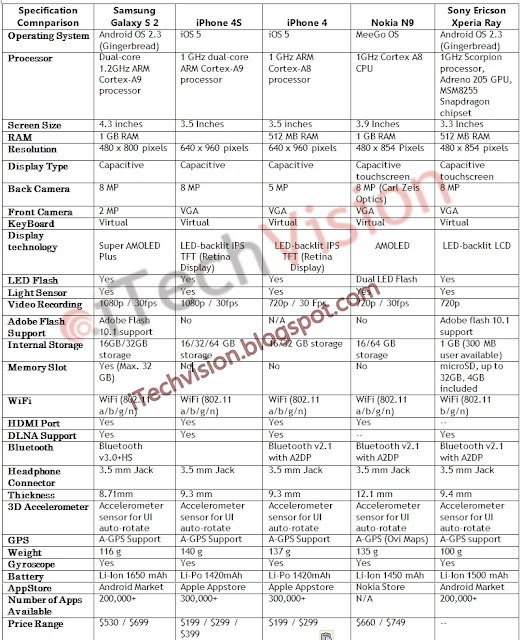
    iphonespecification-comparison-iPhone4s-vs-galaxy-s2-vs-Xperia-ray-nokia-N9-vs-iPhone4

    *RAM 512 MB
    *Bluetooth v2.1 with A2DP

    To see other Comparisons check out this link.

    Despite our efforts to provide full and correct specifications, there is always a possibility of admitting a mistake. If you see any wrong or incomplete data, please LET US KNOW.

    For More News on Apple, Microsoft, Google, Web And all new trending in Technology World, Stay Tuned with us. Like us on Facebook and Follow Us on Twitter.Source URL: https://nvdem.blogspot.com/search/label/Samsung
    Visit Teleinfo for Daily Updated Hairstyles Collection

Specification Comparison: Samsung Galaxy Tab 7.0 Plus vs Galaxy Tab 10.1 vs iPad 2 vs Galaxy Tab 8.9 [Tablet War]

    Samsung recently announced their new tablet in galaxy tab series it is the new Galaxy Tab 7.0 Plus, This new Tablet have got some amazing specification, and definitely it have some good hardware which could give the iPad 2 some tough time. The size and shape of Galaxy Tab7.0 is also amazing.
    So here we have brought you the specification comparison between Samsung Galaxy Tab 7.0 Plus vs Galaxy Tab 10.1 vs iPad 2 vs Galaxy Tab 8.9. We have also included it's predecessors galaxy Tab 8.9 and 10.1 so you can also differentiate between these two.


    Comparison: Samsung Galaxy Tab 7.0 Plus vs Galaxy Tab 
    10.1 vs iPad 2 vs Galaxy Tab 8.9:


    (click on the Image to Enlarge)


    Despite our efforts to provide full and correct specifications, there is always a possibility of admitting a mistake. If you see any wrong or incomplete data, please LET US KNOW.


    For More News on Apple, Microsoft, Google, Web And all new trending in Technology World, Stay Tuned with us. Like us on Facebook and Follow Us on Twitter.Source URL: https://nvdem.blogspot.com/search/label/Samsung
    Visit Teleinfo for Daily Updated Hairstyles Collection

Samsung Focus S Leaked [Image]

    As most of the people know that Microsoft will soon release their new OS code-named "Mango" and with the release of this new OS we'd likely to see some new Smartphones running this new OS. Today an Image has been leaked on the internet of the new Samsung Focus S which was previously been announced for AT&T but no images were shown. So folks at Pocketnow are the first one to get this new images which they shared with us.


    This device will run the new Mango OS, Here are the following information i.e known about the device from its press release:
    The Samsung Focus™ S builds on the success of the award-winning and highest-selling Windows Phone in the U.S., the Samsung Focus™. Featuring a 4.3-inch Super AMOLED Plus display, 1.4 GHz processor, 4G-capable speeds and a thin profile at 8.55 millimeters. It includes front facing 1.3-megapixel and a rear facing 8-megapixel cameras. The Samsung Focus S will find its way into a lot of pockets this fall.
    There's no specific date known of when it will be officially released, but it's not too far away.

    Other than that, to let you know that Samsung has already announced an new SmartPhone which will be running the Mango OS and will release soon, this new smartphone is called as "Samsung Omnia W". Check out details and specification of this new smartphone here.

    For More News on Apple, Microsoft, Google, Web And all new trending in Technology World, Stay Tuned with us. Like us on Facebook and Follow Us on Twitter.Source URL: https://nvdem.blogspot.com/search/label/Samsung
    Visit Teleinfo for Daily Updated Hairstyles Collection

Samsung Announced 'Omnia W' Smartphone - 1.4Ghz Processor, Mango [Specification]

    So Samsung is the first Manufacturer who has just announced an new Smartphone which will be featuring Microsoft's new mobile OS code-named "Mango". The smartphone they announced today is the new "Samsung Omnia W", Featuring an elegant design, a vivid Super AMOLED display as well as an enriched content and social communication experience enabled by People Hub.


    Specification:


    Network


    HSPA14.4/5.76Mbps 900/2100
    EDGE/GPRS 850/900/1800/1900


    Processor


    1.4 GHz Processor


    Display


    3.7” WVGA(800X480) Super AMOLED


    OS


    Windows Phone 7.5 Mango


    Camera
    Main(Rear) : 5 MP AF with LED Flash
    Sub (Front) : VGA for Video Call


    Video


    Codec : MPEG4/H.263/H.264/WMV
    Playback : 720p @30fps
    Recording : 720p@30fps


    Audio


    Codec : MP3/AAC/AAC+/eAAC+/WMA/AMR-NB
    Zune Player
    3.5mm Ear Jack, FM Radio with RDS


    Value-added Features


    Marketplace Hub – free and paid Apps


    People Hub – Windows Live, Facebook, Twitter, Linkedin built-in


    Picture Hub


    Music & Video Hub – Zune Experience


    Game Hub – Xbox Live


    Office Hub – Microsoft Office


    Samsung’s Enriched Apps
    - Now, RSS Times, Video Call(3G), Photo Studio, Mini Diary, All Share(DNLA),
    Fun Shot, Wireless Manager
    - Dictionary (downloadable, except US, Canada, Mexico), Photogram (downloadable),
    Rubik’s Cube(downloadable)
    Windows Live Skydrive® (Free 25GB Storage)
    Tile-based Metro UX / IE9 mobile
    A-GPS / Bing Map


    Connectivity


    Bluetooth® technology v 2.1
    USB 2.0
    Wi-Fi 802.11 b/g/n


    Sensor


    Accelerometer, Ambient Light, Proximity, Magnetometer, Gyroscope


    Memory


    512MB(RAM) + 8GB Internal Memory


    Size


    115.97 x 58.8 x 10.9mm, 115.3g


    Battery


    Standard battery, Li-on 1,500 mAh


    Images:


    We'll soon give you more details and comparisons of this new Smartphone with others. So stay tuned!

    For More News on Apple, Microsoft, Google, Web And all new trending in Technology World, Stay Tuned with us. Like us on Facebook and Follow Us on Twitter.


    [Samsung Official]Source URL: https://nvdem.blogspot.com/search/label/Samsung
    Visit Teleinfo for Daily Updated Hairstyles Collection

Android 2.3.5 Gingerbread XXKI3 ROM Leaked for Samsung Galaxy S 2 [Install]

    Samsung is now looking forward to update their latest Smartphone which is known as Samsung Galaxy S II, So before they roll out the new Android 2.3.5 update for Galaxy S 2 Officially, samfirmware  has leaked this update and brings it to your smartphone. This update is Android 2.3.5 Gingerbread for the Samsung Galaxy S II. The firmware version is I9100XXKI3. This update brings performance improvements and security updates.


    What's new in this update:

    • It is First Android 2.3.5 Update for Galaxy s2
    • New visual effect (You can see blue shade on bottom while scrolling down)
    • Both System power saving and Custom power saving mode available
    • Swype version 3.8.86
    • Still no Gtalk Video inbuilt feature


    Those users who can't wait for the device to be officially updated, they can visit this link and follow the guide to get the new update on their phone.

    For More News on Apple, Microsoft, Google, Web And all new trending in Technology World, Stay Tuned with us. Like us on Facebook and Follow Us on Twitter.Source URL: https://nvdem.blogspot.com/search/label/Samsung
    Visit Teleinfo for Daily Updated Hairstyles Collection

Samsung Galaxy S 2 has the fastest GPU than any SmartPhone around [Benchmark]

    According to a new Benchmark of Samsung galaxy S II taken by Anandtech, during their review of Galaxy S 2 they've found that this smartphone have got the fastest GPU (Graphic Processing Unit) than any smartphone right now available. It’s the first smartphone to use the graphics processing unit based on the Mali-400 core from ARM Holdings, a fables chip maker from the UK.


    The GPU of Galaxy S 2 is called as Exynos 4210 and it combines a dual-core Cortex-A9 CPU core and the aforementioned Mali-400 GPU sporting four cores.
    Samsung implemented a 4-core version of the Mali-400 in the 4210 and its resulting performance is staggering as you can see above. Although it’s still not as fast as the PowerVR SGX 543MP2 found in the iPad 2, it’s anywhere from 1.7 – 4x faster than anything that’s shipping in a smartphone today.
    It’s also nearly four times speedier than iPhone 4′s 800 MHz A4 chip which has the PowerVT SGX535 GPU core. However, the 4210 falls short in the triangle throughput department.

    Rather then just being best in smartphones the Exynos 4210 is more than twice as fast compared to the Galaxy Tab 10.1 that runs Nvidia’s Tegra 2 chip.

    Here's the review of Galaxy S 2, If you've missed it:


    For More News on Apple, Microsoft, Google, Web And all new trending in Technology World, Stay Tuned with us. Like us on Facebook and Follow Us on Twitter.


    [Via]Source URL: https://nvdem.blogspot.com/search/label/Samsung
    Visit Teleinfo for Daily Updated Hairstyles Collection

Samsung Galaxy S II Now officially available for Sprint, T-Mobile, and AT&T

    Today Samsung made an official announcement of Samsung Galaxy S 2 to be available for stateside customers on Sprint, T-Mobile, and AT&T. So you people already know a lot about this new Smartphone, 1.2GHz dual-core processor, 4.52″ AMOLED display, 16GB of internal storage and an 8 megapixel camera. 4G-capable chips on each carrier’s respective next-gen network, but AT&T and T-Mobile users are restricted to HSPA+.


    So, Samsung Galaxy S II will be launched on Sprint September 16th, AT&T on the 18th, and on T-Mobile at a yet to be announced date.

    Official Press Release:

    NEXT GENERATION OF SAMSUNG’S FLAGSHIP SMARTPHONE PORTFOLIO – GALAXY S II – READY FOR U.S. ARRIVALSamsung’s fastest selling smartphone in the world coming soon to AT&T, Sprint and T-MobileDALLAS, August 29, 2011 — Samsung Telecommunications America (Samsung Mobile)1, the  No. 1 mobile phone provider in the U.S., today announced the Galaxy S™ II will be available  with AT&T, Sprint and T-Mobile starting this fall. The U.S. launch follows the successful debut of the Galaxy S II in Europe and Korea, where consumers bought 5 million smartphones in 85 days, making the device Samsung’s fastest selling smartphone ever. The next generation Galaxy S II portfolio packs industry-leading hardware and software and the latest version of the Android smartphone platform into each device. The Galaxy S II portfolio is highlighted by  Samsung’s own  Super AMOLED Plus display technology, a powerful dual core application processor and a robust array of entertainment, messaging, social networking and enterprise experiences.
    “The unveiling of the Galaxy S II is a landmark achievement for Samsung, our carrier customers and consumers,” said Dale Sohn, president of Samsung Mobile. “Five million Galaxy S II smartphones have been sold around the world and that number increases every day. We believe the cutting-edge design, features and user experience of this innovative device will share the same level of success in the U.S.”
    The three smartphones within the Samsung Galaxy S II portfolio are designed with an ultra-thin form factor and brilliant Super AMOLED Plus touch screen display. Recent independent studies showed that Samsung’s Super AMOLED Plus display technology was preferred 2 to 1 over any competing display technology in the market today2, thanks to touchscreen’s ability to deliver brilliant colors with the most contrast, providing a vivid and crisp viewing experience.
    All three Galaxy S II smartphones are enabled with 4G3 service for fast connectivity speeds and dual core processors for seamless web surfing, console-like game play and rapid content downloads.

    Personalized CustomizationThe Galaxy S II portfolio features an improved Samsung TouchWiz user interface, providing superior multi-tasking, application management, and customization and includes Live Panel which provides a magazine-like widget view for immediate access to weather, social updates, email, news, photo gallery and more, all of which can be customized on the home screen.  All of the Samsung Live Panel widgets can be positioned and re-sized to create rich, visual home screens and provide one-touch access to the information consumers use most. Touchwiz UI also includes Quick Panel which allows instant access to commonly used device settings like Wi-Fi, Bluetooth, GPS, and other key device features. The TouchWiz UI notification service on the lock screen notifies users to the number of unread or new text messages, and missed calls that have been sent to you on your Galaxy S II. Users get direct access to missed calls and text messages from the lock screen by swiping the notification boxes without having to navigate through the applications menu.
    Each of the Galaxy S II devices feature six-axis motion sensing using an accelerometer and gyroscope that support advanced touch screen gestures, including motion to zoom in on images, silence a ringing phone, and even move widgets on the menu screens.
    Premium ContentGalaxy S II will also include Samsung’s popular Media Hub movie and TV content service.  Media Hub features thousands of new release and top-grossing titles from major Hollywood studios and leading television networks, including NBC Universal, Paramount, MTV, Warner Bros., CBS and FOX. The content service has added a new feature called Media Hub Show, allowing the user to playback Media Hub content on a TV through an HDMI cable connected to a Galaxy S II dock or HDTV Smart adapter accessory. Users can share purchased to own film or TV content across up to five devices enabled with Media Hub at no additional cost.  Alternate premium video options include Android Movies, Netflix, and others which are available to download from Android Market™.

    Samsung’s Social Hub service on the Galaxy S II transfers email, instant messaging, contacts, calendar and social network connections, including Twitter, Facebook and LinkedIn accounts, into “Feeds” and “Messages” folders that can be either separated into separate tabs or combined into comprehensive lists.
    Samsung’s Galaxy S II portfolio is powered by the open and innovative Android Gingerbread platform, complete with full support of Google Mobile Services including Android MarketÔ with access to more than 250,000 applications, Google Search, Google Maps, Gmail, YouTube, Google Talk and more.
    In addition, Galaxy S II and the Android Gingerbread platform support an array of cloud services including content sync across the Galaxy branded portfolio with Google services (Books, Music, Videos, Email, Calendar) Samsung Media Hub and cloud photo sync through Picasa Web Albums and Google+.

    Uncompromised ConvergenceThe Galaxy S II portfolio offers a number of convergence features to share content in tethered and wireless formats. With Samsung’s All Share application, which enables inter-device connectivity through DLNA (Digital Living Network Alliance) technology, users can send user-generated video content wirelessly to other DLNA-enabled devices, such as TV’s, monitors and laptops, allowing for an interactive entertainment experience. The TV Remote App, also available through Android Market, transforms the Galaxy S II into a remote control for several top models of Samsung HDTVs. Smart Show and Media Hub Show enables the user to tether an HDMI over micro USB connection to an HDTV to play user generated or Media Hub DRM protected content respectively directly from the Galaxy S II device to the HDTV screen.  Samsung Kies Air service allows users to connect their PC or Mac via WiFi without a preloaded application to easily view and manage your content. Users can transfer files, manage contacts and messages and send SMS from the PC.
    Optimal Enterprise SolutionsGalaxy S II integrates a range of enterprise solutions that expand the business capabilities of the devices. The Galaxy S II portfolio provides support for exchange device management policies, offers increased security of data and services and enables mobile conferencing while on the go.  Galaxy S II also features productivity enhancement capabilities such as the ability to create and respond to meeting requests, view, edit, and create Microsoft®-compatible documents, spreadsheets, and presentations, global address lookup (GAL), and more.
    Additional enterprise solutions include:
    • On-device encryption of user data

    • Full support for Exchange ActiveSync® version 14

    • Cisco VPN (Virtual Private Network)

    • Sybase MDM (Mobile Device Management)

    • Cisco WebEx mobile conference solution

    Additional features of the Galaxy S portfolio include:
    • 8-megapixel Rear-Facing Camera with Autofocus & Flash & 1080p HD Video Recording/2-megapixel Front-Facing Camera:

    •  The Galaxy S II portfolio features an 8 megapixel camera with flash and can record video in 1080p HD high profile offering the richest video content on a smartphone. Plus, the front-facing 2 megapixel camera provides video chat capabilities for personal and business communication on-the-go. Galaxy S II supports popular video conferencing services like Skype, Fring, Qik and Tango.
    • Voice Talk

    • : The Galaxy S II Voice Talk feature allows users to give their Galaxy S II device voice commands, including voice dial, text message, navigation, music, Web browsing and search. When docked into the car dock, the Galaxy S II automatically defaults into Voice Talk mode.  Users can instantly activate the Voice Talk application by a long press on the search key.
    • Task Manager

    • : View and close the applications users have active, what items have been downloaded and check on memory usage via the Task Manager widget.
    • Screen Capture Feature

    • : Users can easily take a screen grab of the phone screen by pressing the power button and the home key simultaneously.
    • Memory

    • : All three Galaxy S II devices offer 16GB of on-board memory, as well as a microSD card slot that supports up to a 32GB memory card.

    Premium Accessories PortfolioA host of premium Galaxy S II accessories, including convenient solutions for docking, convergence, and backup battery charging will be available for each smartphone, providing users with an enhanced mobile experience.  A multimedia dock is the perfect smart accessory, allowing users to transform their Galaxy S II into a home stereo by connecting speakers or plugging it into a home entertainment system via the 3.5mm stereo connector. Its ability to orient with the phone while docked makes it easy to view content in portrait and landscape mode, while the auto-launch of its Desk Dock UI makes for easy access to music, video and other applications.
    Additional accessory solutions include:
    • Vehicle dock: 

    • The dock charges the phone while docked to ensure uninterrupted GPS usage on long car rides. The dock is windshield or dashboard mountable and includes the sophisticated Vlingo Voice Talk, allowing users to enjoy hands-free control of their Galaxy S II.
    • Battery charging stand with spare battery: 

    • This charging solution ensures a backup battery is always on hand, while providing a convenient kick stand for the Galaxy S II.
    • HDTV Adapter

    • : The HDMI adapter supports HD video up to 1080p from the phone to an HDTV, projector, or monitor. Use on the go to connect the Galaxy S II to a TV, monitor, or projector to view purchased Media Hub content, videos, presentations, games, or internet on a big HD screen, or listen to downloaded music from the phone on a home entertainment system.


    For More News on Apple, Microsoft, Google, Web And all new trending in Technology World, Stay Tuned with us. Like us on Facebook and Follow Us on Twitter.Source URL: https://nvdem.blogspot.com/search/label/Samsung
    Visit Teleinfo for Daily Updated Hairstyles Collection

Samsung Galaxy Tab 10.1 Two New Commercials - “Lighter Tablet” & “It’s Time to Tab” [Videos]

    Samsung has now released two new commercials/Promo Videos for their latest tablet called as the new "Galaxy tab 10.1". So check them out Below:


    The Samsung GALAXY Tab 10.1 will not weigh you down with its 565g lightness.

    * For more product information, visit: http://bit.ly/samsunggalaxy_tab

    The Samsung GALAXY Tab 10.1 gives you a better experience for work and play. Sharper HD quality screen, better web browsing with flash, better multitasking, and even better speed with HSPA+.


    You would also like to see:


    For More News on Apple, Microsoft, Google, Web And all new trending in Technology World, Stay Tuned with us. Like us on Facebook and Follow Us on Twitter.
    Source URL: https://nvdem.blogspot.com/search/label/Samsung
    Visit Teleinfo for Daily Updated Hairstyles Collection

Samsung Galaxy 2 new commercial "Unleash Your Fingers" [Video]

    Samsung has recently released another new commercial for their latest phone so called the Galaxy S II. We've already seen few commercials of Galaxy S 2, and in all of them they only discussed the features of the Phone. But this one's a little different. you should check out this Ad Video:

    For the launch of the Galaxy SII in France, Samsung brought JayFunk, the internet Finger Tutting phenomenon, from Los Angeles to Paris to deliver an incredible and surprising choreography.


    For More News on Apple, Microsoft, Google, Web And all new trending in Technology World, Stay Tuned with us. Like us on Facebook and Follow Us on Twitter.
    Source URL: https://nvdem.blogspot.com/search/label/Samsung
    Visit Teleinfo for Daily Updated Hairstyles Collection

Samsung to Release 1.2 GHz dual-core Galaxy Tab 7 this September?

    It has been reported that Samsung is now working on another tablet which they'll release this Autumn. The report claims that this new Tablet might be called as Samsung's new "Galaxy tab 7" and this would supposedly be a successor to the original Galaxy Tab. Which would have the same characteristics as of the Galaxy S II Phone. All the hardware as rumored are same as that of Galaxy S 2 except the Screen.

    Specification:

    Nothing is much confirmed about this new Galaxy Tab 7 but according to the report it would have 1.2GHz dual-core CPU with 1GB RAM (Exynos chipset), a 7" WSVGA IPS LCD screen, 16GB built-in memory expandable by microSD cards. There will be a USB host connectivity via the proprietary Galaxy Tab connector and might have an HDMI output.

    Above was the Hardware for the Galaxy Tab 7, Inside it is claimed that Galaxy Tab 7 will powering Android 2.3.4 Gingerbread with TouchWiz 4.0, yes it won't be featuring Honeycomb at the starting. And other than that it will also function as a Phone to make voice and video calls and send SMS just like the Tab 8.9.

    As it is an successor to the original galaxy Tab which was released at IFA Event. So it is again rumored that Galaxy Tab 7 might be unveiled at IFA which is to held this September(Autumn).

    Stay Tuned!

    For More News on Apple, Microsoft, Google, Web And all new trending in Technology World, Stay Tuned with us. Like us on Facebook and Follow Us on Twitter.

    [Source]
    Source URL: https://nvdem.blogspot.com/search/label/Samsung
    Visit Teleinfo for Daily Updated Hairstyles Collection

Samsung's Galaxy Tab 10.1 New Ad Turns Down iPad 2 for not Having Flash [Video]

    Samsung has now released another Ad/Promo Video for Galaxy Tab 10.1. In this Ad Video they have shown some features of this new tablet. But other than Showing the features of Galaxy Tab, They have also criticised the iPad 2 also(a little bit). The ad hints at Apple iPad 2 lacking Flash content support which is a big advantage for Android users over iOS.


    Check out the Video Below:


    For More News on Apple, Microsoft, Google, Web And all new trending in Technology World, Stay Tuned with us. Like us on Facebook and Follow Us on Twitter.
    Source URL: https://nvdem.blogspot.com/search/label/Samsung
    Visit Teleinfo for Daily Updated Hairstyles Collection

Magazine Reader App for Android Phones and Tablets released by Zinio [Download]

    Finally Zinio has released an Official Magazine reader for Android Phones and Tablets. This app gives you the best experience of reading Magazines virtually, as it provides android users with more than 20,000 digital magazine titles. The good thing about it is that if you install this App now, you'll get issues of two dozen popular magazines free of charge until June 15.
    Zinio Magazine reader app is compatible with Android Froyo/Gingerbread smartphones and Honeycomb tablets.


    Description:
    Zinio is the premier app for magazines on Android, featuring top titles from around the world in pure digital form. With Zinio, you can browse the world's largest newsstand, download digital subscriptions or single issues of your favorite magazines and sync your library on multiple devices. You can read what you like wherever and whenever you want!


    Download:
    You can download this App from Android Market. Click here to download.

    For More News on Apple, Microsoft, Google, Web And all new trending in Technology World, Stay Tuned with us. Like us on Facebook and Follow Us on Twitter.
    Source URL: https://nvdem.blogspot.com/search/label/Samsung
    Visit Teleinfo for Daily Updated Hairstyles Collection

1 Million Samsung Galaxy S 2 shipped in South Korea, In Just 30 Days [Report]

    Samsung's latest dual core mobile phone that is the Samsung Galaxy S 2 has now been released in South Korea and some of the other parts of the world. Samsung Galaxy S 2 has some outstanding sale in South Kore. As it's been reported that some 1 Million units have been shipped in South Korea in Just 30 days.


    Samsung has broke their own record as compared to the past, They sold some 1 Million Galaxy S Phones in 70 days and this time in 30 Days they sold 1 Million S 2 Smartphone. Other than that Galaxy S II is now the fastest selling device in South Korea even faster than iPhone 4.

    It is those extra ordinary features of Samsung Galaxy S 2 which attracted so many users to it, like it have got 21 Mbps 3G modem, 8.9 mm body, and the new version of TouchWiz, dual core processor and near field communication (NFC).

    J.K. Shin, President of Samsung’s Mobile Communications Division told in an interview that Samsung will release upcoming Samsung Galaxy S III in first half of 2012 with out giving any further details about it’s feature. But we are sure it will be load up with Dual core processor with Android Ice Cream Sandwich OS without physical buttons on front of the device.

    For More News on Apple, Microsoft, Google, Web And all new trending in Technology World, Stay Tuned with us. Like us on Facebook and Follow Us on Twitter.
    Source URL: https://nvdem.blogspot.com/search/label/Samsung
    Visit Teleinfo for Daily Updated Hairstyles Collection

Samsung Galaxy Tab 10.1 now Available for Pre Order for $499

Guide: How to Root Samsung Galaxy Tab 10.1

    Samsung's New Over Hauled latest tablet the "Galaxy Tab 10.1" has finally been rooted by Developers. It is right that this Tablet is not yet available Publicly, But some Developers got a Hands on and they tried to root it and they got successful. It Runs the New Android HoneyComb.
    So whenever you got Hands on with this new Tablet you'll be able to root it by following our simple guide below.


    Guide: How to Root Samsung Galaxy Tab 10.1:


    Step2: From adb, run the following command (without quotes) “adb push allidoiswin.zip /sdcard/allidoiswin.zip”

    Step3: Now punch in “adb reboot recovery”

    Step4: Now simply flash the Zip file which you put via Adb, that’s it after running zip file your Samsung Galaxy Tab 10.1 will be fully rooted now get superuser access.

    For More News on Apple, Microsoft, Google, Web And all new trending in Technology World, Stay Tuned with us. Like us on Facebook and Follow Us on Twitter.
    Source URL: https://nvdem.blogspot.com/search/label/Samsung
    Visit Teleinfo for Daily Updated Hairstyles Collection

Samsung Galaxy S 2 Official Hands On Video

Samsung Galaxy S 2 New "Dual Core" Commercial [Video]

    Samsung has released another new Ad for Galaxy S 2 regarding it's new Dual Core 1.2 GHz Processor. Showing that the Processor of this Phone makes it extremely fast. Check out the Video Below:


    With its 1.2 GHz Dual Core processor, the Samsung GALAXY S II has a fast, smooth and seamless connection.
    For More News on Apple, Microsoft, Google, Web And all new trending in Technology World, Stay Tuned with us. Like us on Facebook and Follow Us on Twitter.
    Source URL: https://nvdem.blogspot.com/search/label/Samsung
    Visit Teleinfo for Daily Updated Hairstyles Collection

Guide: How to Get Root Access to Samsung Galaxy S 2 on Android 2.3.3

    So if you're interested in Rooting your New Samsung Galaxy S 2 to get some extra features, you're at the right place. One of the SDA Developer named Chainfire has got successful root access to Samsung Galaxy S 2.

    If you are Unaware with that, Superuser access is gained by using the Samsung flashing utility ‘Odin’ to flash the handset with a custom kernel. So after a Reboot Super User access is Possible Using "adb" which is same like Command Prompt in Windows.
    The Root access by this method is not permanent, It requires further steps to enable permanent superuser access by manual loading of su, busybox, and Superuser.apk. Chainfire was able to re-package this modified kernel by using methods effective on the Galaxy S series of devices, without an actual Samsung Galaxy S II to develop/test with.
    How to Root Samsung Galaxy S II [Guide]:
    Following is a guide on how to perform the root. It is rather easy if you know the drill from other Galaxy devices, but if you are a complete beginner with Samsung phones or Android in general, please read very closely! Try to remember what you do, as likely in the future you’ll be using ODIN more often, to flash custom kernels, custom/leaked firmwares, etc.

    Quick guide (for experienced users)
    - Reboot into download mode
    - Using the attached Odin version, flash the attached XWKDD kernel as PDA. Do not use the PIT, do not have any options checked except for “Auto reboot” and “F. Reset Time”
    - Wait for the device to reboot
    - Use the “adb root” command to restart ADB in root mode, followed by “adb shell” to get a rooted shell; then you can manually push Superuser.apk / su, busybox, OR use SuperOneClick to finish the job for you.

    Long guide (for beginners)
    - Download the attached ODIN file and extract the .zip file
    - Download the attached XWKDD, but do NOT extract the .tar file
    - Download and extract SuperOneClick
    - If you do not have Samsung’s KIES 2.0 installed, download and install it. You need it to install the correct USB drivers, so the programs can communicate with the device. Reboot your computer after installation of KIES.

    - Make sure your device is in USB debugging mode: Settings -> Applications -> Development -> USB debugging
    - Reboot your device into download mode: Turn the device off, then power it on again by pressing and holding VolumeDown + Home + Power simultaneously. You will know when you are in download mode, it is really obvious
    - Start ODIN
    - Connect the device to your computer using USB
    - Wait a few seconds, the ODIN screen should show you that a device is now connected
    - Make sure that in ODIN NOTHING is checked, except the “Auto reboot” and “F. Reset Time” checkboxes. Press the “PDA” button, and select the “XWKDD_insecure.tar” file.
    - Press “Start”. ODIN you should now be flashing the kernel, and the device should reboot.
    - Wait until the device is rebooted, and while still being connected over USB, start SuperOneClick, and press ROOT.
    - Reboot the device
    - Done !

    Please post corrections to this guide if you see I made a mistake in it. Remember, I don’t actually have an SGS2 so it’s hard for me to check

    Enjoy!
    Download Required:
    Odin3-v1.85.zip (198.9 KB)

    You may Also like to see:

    For More News on Apple, Microsoft, Google, Web And all new trending in Technology World, Stay Tuned with us. Like us on Facebook and Follow Us on Twitter.
    Source URL: https://nvdem.blogspot.com/search/label/Samsung
    Visit Teleinfo for Daily Updated Hairstyles Collection